Desertcart purchases this item on your behalf and handles shipping, customs, and support to Monaco.
🚀 Scan smarter, not harder — your desk’s new best friend!
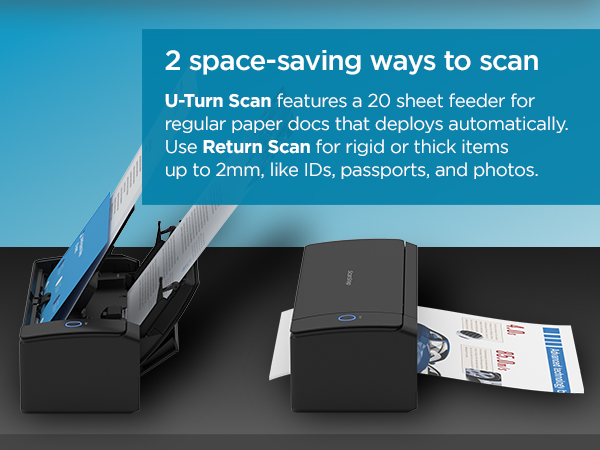
The ScanSnap iX1300 is a sleek, space-saving wireless and USB document scanner delivering fast, high-quality double-sided color scans at 600 dpi. Perfect for busy professionals, it handles diverse media types with ease and integrates seamlessly with Mac, PC, mobile, and cloud platforms via intuitive ScanSnap Home software.


| ASIN | B09FX5DWBK |
| Best Sellers Rank | #3,108 in Office Products ( See Top 100 in Office Products ) #3 in Document Scanners |
| Brand | ScanSnap |
| Color Depth | 48 bits |
| Connection Type | USB, Wi-Fi |
| Connectivity Technology | USB, Wi-Fi |
| Customer Reviews | 4.1 out of 5 stars 1,827 Reviews |
| Item Dimensions D x W x H | 4.5"D x 11.7"W x 3.3"H |
| Item Type Name | Scanner |
| Item Weight | 4.4 pounds |
| Light Source Type | LED |
| Manufacturer | PFU Limited |
| Media Type | Paper |
| Minimum System Requirements | Windows 11 / Windows 10 (32bit/64bit), ARM, Intel, or Intel-compatible processors; macOS Monterey 12 or later, iOS 16.0 or later, iPadOS 16.0 or later; Android 10.0 or later, ChromeOS 138.0.7204.178 or later |
| Model Name | iX1300 |
| Optical Sensor Technology | CIS |
| Product Dimensions | 4.5"D x 11.7"W x 3.3"H |
| Resolution | 600 dpi |
| Scanner Type | Document, Receipt |
| Standard Sheet Capacity | 20 |
| UPC | 097564309892 |
| Unit Count | 1 Count |
| Warranty Description | 1-Year Depot warranty |
| Wattage | 17 watts |
C**S
Worth every penny... Adding three more to our office!
BEST SCANNER! My colleagues are jealous of my scanner, saying mine is turbo charged compared to theirs which are both name brand scanners. Highly recommend! The application is easy to setup and use, straightforward, simple navigation and fast processing. (You'll need PDF editor software - I HIGHLY recommend Nitro PDF! Worth every penny!) The scanner itself is compact, clean looking and fits in limited spaces. The actual process is so quick and has multiple ways to scan, scans double-sided docs automatically, and can handle scanning various size papers at the same time. So far, I have gotten two of these and am looking to get three more for the rest of my office that I manage. We process auto titles for our three dealerships and a service shop, to say we scan a lot would be an understatement! I highly recommend these and think they're worth the price tag!
S**Y
This scanner is amazing...
I have been buying, owning & operating tech gadgets since the late 70's and this scanner ranks up there with the best on that list. Just look at these features: a) USB or Wi-Fi option b) compact size - easy to pull out when needed and then store for later - not a lot of desk space c) duplex scans of standard paper document in about 2 seconds each d) duplex scans photos at 600dpi in about 5 seconds each e) auto top feeder (about 10 sheets) or manual front feed We have another brand's multi-function color laser unit that we bought several years ago (for a good chunk of cash) which has served us well. However when the wife suggested we scan all our old photos (boxes & boxes of loose photos and shelves of photo albums) - I knew I was not going to spend years scanning two or three photos at a time with that thing's flatbed scanner. I read the reviews and most suggest another brand's scanner that is almost twice the price of this one. I decided to take a chance and be a bit more thrifty and it has worked out more than I could have hoped for. Mostly that decision came down to this model's manual front feeder. In one week I have spent about 4 hours with this scanner and have scanned almost 1k photos. The most time-consuming part is taking the photos out of the albums. I just pop them in the front manual feeder and then let the scanner spit it back out where the photo then drops into a bin underneath for disposal - each photo takes about 5 seconds scanning at 600dpi and the quality is good enough (note: the quality really depends on how good the original photo looks. those old 70's polaroid's are not going to scan and then be able to printed at 24"x36" size down the line - let's be realistic - but they look good enough to me on the computer reviewing them afterwards). My only wish is that it could scan at 1200dpi but that would certainly jack up the price. There are a few pictures which we put aside to scan with the multi-function scanner for this reason because those pictures have more sentimental value. I had two occasions this past week needing to scan a full-size paper bill and decided to use this instead of the multi-function. It scans a piece of paper both-sides so fast that it is done before you blink. The software is very basic but it is completely functional. Since this is just a scanner I am glad the software just concerns itself with the simple scan settings and not image manipulation or PDF editing. I have purpose-made software to do that other stuff.
S**P
ScanSnap iX1300 — The Compact Powerhouse I Didn’t Know I Needed
I’ve had the ScanSnap iX1300 for a little while now, and I’m honestly blown away by how good this compact scanner is. It’s small, but the moment you feed a page into the front, it wakes up instantly, pulls the document in, scans both sides fast, and sends it straight to ScanSnap Home without any fuss. The automatic paper handling is one of my favorite parts — the feed arm pops out on its own when you open the top, and the return tray actually slides out during scanning to catch the pages, then tucks itself back in when it’s done. It feels incredibly well‑designed. The setup was simple, the wireless connection has been rock‑solid, and the ScanSnap software is surprisingly powerful. It even names documents automatically based on the first line if you want it to. The scan quality is excellent — better than I expected from something this compact. I’m very picky about how my equipment works, and this scanner has been perfect for my needs. I’m really happy with this purchase and wouldn’t trade it for anything.
S**L
werkingsduur wordt steeds korter
I bought the first one in 2022.. After almost two years, in March 2024, it broke down. I quickly ordered a new one. The qualities of the second device, especially the software, were very disappointing. I bought my first Scansnap because of the quick succession of scanning documents. That is "no longer" due to the "automatic" scan function that apparently cannot be switched off. You now have to press OK after scanning each individual document, sometimes this can be done quickly via an Enter, but sometimes it only works via the mouse. With those unnecessary actions, the speed is gone. Another disadvantage is that if you want to scan receipts, the device chooses to scan only 1 side. This even goes so far that if a receipt is in the scanner the wrong way around, a white document is delivered. But beware, that's not all: if you have made an [important] note on the back of a receipt, it will NOT be scanned - because it is a receipt. Yes, that means that you now have to check your equipment, the scanner and your laptop, on the work done to see if they have done their job together properly. Terrible. In my view, the computer checks me, my job is not to check the computer and the peripherals. Thanks Scansnap for the lost notes. But now it is the end of October 2024 and now the "new" device is showing the necessary quirks again. The device thinks that there is already a document in the manual feed, while that is not the case. After this thought, the device does nothing more. This one can also go on the waste mountain. But this is half a year after I bought this new one. I think that is going too far. In summary: this used to be a nice scanner but it is nothing anymore, well, it is a device with a lot of quirks and it eats up my time and attention.
A**T
Great options, with a few little issues
I purchased this product for the insurance side of our medical practice. They scan a lot of documents throughout the day, all day, every day. Their old scanner just died out after many years so we opted to replace with this one. For ease of writing and reading, I will just list some pros and cons here. Pros: - The scanner is small. Not too small to scan things normally but very compact, which is ideal for their very busy workspace. - It scans quite well. Once we jumped some hurdles in set up (will dive into below), the scanner has been great! It scans very quickly, the image quality is always great, and the software is relatively easy to use (ONCE IT IS SET UP PROPERLY) - It is quiet, quick, and to me, fun to watch! The scanner sends your paper on a gymnast course which can just be fun for me to watch! (video included) Cons: - The set up was a bit of a headache. Part of that is on our end with our computers. The other part of that is the lack of instructions to troubleshoot during set up. I ended up on the phone with their support as well as our IT trying to get it set up. It took 4 days of phone calls to get that working. I don't feel as though it should be *that* difficult to connect a scanner and get it working. - A week or two after we got it all set up, it stopped scanning. It would only accept manual feed, which is not a great option for our busy medical practice. Again, multiple days on the phone with support and IT. Turns out, the sensor needed cleaned. Again, not a big deal, I just don't feel like it should take days to troubleshoot and fix something so simple. - Only one user can scan at once. Now this doesn't seem like a problem but if someone else pulls up the ScanSnap software, the other person is then booted out of being able to scan. It's not a big problem, more of a nuisance than anything else. All in all, it gets the job done. If you are a pro at set up, know scanners in and out, or are just a patient person - you will have no problems with this. Like I said, this could be mostly attributed to our computers and others may not have had these issues! Once all is working well, it is a great scanner!
A**R
If I could give 10 stars, I would
I’m probably crazy but 20 years after college I still was holding onto my college notebooks and I refused to throw them out. We needed the space and so I decided to scan them with a printer/scanner combo. With over 25 classes of notes, it was taking an hour per class PLUS the notes were not duplex so I had a scan of the odd and even pages. As with just about any printer, I basically need to fix it every time I use it. The printer/scanner experience is just a trash fire. After so many paper jams and not trying to lose my sanity, I started looking for another solution. It didn’t take long to find this amazing scanner. Amazon delivered fast and the install was effortless on my Windows 11 PC. The instructions are so easy to follow, you connect it with a physical wire and then immediately it shows you how to set it up for wireless. It just works EVERY TIME. This thing is fast. As I stated earlier, it was taking me an hour to scan a single class of notes with my printer/scanner. This scanner completed all of my 25 class notes in under 3 hours. Plus all the scans look beautiful AND they are duplex (front and back of pages) in PDF format. The software is so easy to use. I’ll admit that the first few scans required some adjustment but once I got it tuned it was perfect. I was also afraid of getting any new devices since space is at a luxury in my home office. This thing is small. It folds up and I can slide it into a drawer. Everything about this device is awesome and just well designed. If you need a scanner look no further. It isn’t cheap but you a definitely going to love what you are getting if you pick up this scanner. Just the time saved during the holiday season more than made up for the cost.
K**N
Wonderful product!
This document scanner worker well for me. I did not have a problem with paper jams. I think thats a user error for the ones that did. Scanned both sides. Is able to scan 20 at a time. Sometimes a couple of pages stick together and get fed at the same time so you may skip a scan. But not a huge deal as it only happened once and as long as you pay attention as it scans you can keep up with what you missed and go back to correct it. I have fully digitized my artwork and will be making it into a pdf so I can print a book of it. I have more plans for this thing and this was more of an investment for me to make my books and create my own custom fonts and more. Def good if u want to scan multiple documents faster and have them line up. I think the trick here is to get your stack as straight and aligned on all edges as perfectly as you can. As well as dont try to scan anything very wrinkled up or anything. If yoi have a paper that would likely jam in a stack, then just scan that one by itself. I love how easy it is to scan to with a physical button on the device. This has been a breeze. Compatible with windows 11.
B**N
Simple to use and amazingly fast.
I had a stack of historical documents that needed to be scanned and was trying to use a manual scanner to slog through it. This device wasn't cheap but I figured I'd splurge and see if it performed as promised. I hadn't even had the thing out of the box more than two hours and I was finished. Couldn't believe it. Installed the software from the web, powered it up, hooked up the USB then configured it for WiFi. It connected no problems, disconnected the USB and loaded up my first stack of documents. Hit the scan button, saved to a folder as PDF. Great quality, the software is basic but offered fantastic editing options like rearranging the order of pages when you stacked them wrong. The scanner copied both sides at once and detected if it was blank or not. I am absolutely amazed at how easy it was to setup and to use. Folds up nice and compact for storage when you are done. WiFi means only one cord going to it. I'm loving this thing.
L**S
Amazing Scanner
This scanner is amazing, so small yet can scan multiple items into your laptop or phone in seconds.
M**D
Great!
Great!
M**T
Compact et efficace.
Je l'utilise depuis 3 jours et je l'apprécie beaucoup. Très facile à utiliser. J'ai scanné des papiers, des reçus et des photos. On peut mettre jusqu'à environ 25 feuilles ou photos à la fois. Je n'ai eu qu'un seul bourrage de papier, mais il faut dire que le papier était très épais. J'ai scanné les feuilles une à la fois et je n'ai pas eu de problème. J'ai aussi essayé de mettre plusieurs photos à la fois et ça l'a très bien fonctionné. Je cherchais à scanner plusieurs photos rapidement et facilement, et pour cela, ça fonctionne très bien. Pour les photos d'archive ou celle qui demande un traitement particulier, je ne pense pas que ça soit le meilleur scanner pour ça.
M**M
The best
The best
D**T
No UK shipped or correct power cable.
No obvious from the listing that this will be shipped to the UK form Overseas. Arrives with a non -UK power plug
Trustpilot
2 months ago
2 months ago